GameLynx Download

You own 2,000 games.
How many of them have you finished?

Steam and PlayStation show you what you bought. GameLynx shows you what you can do with it: how many hours your backlog holds, what is nearly finished, and how long the one you are looking at will take. On your Steam Deck, your computer and your phone.

Runs on Windows Steam Deck and Linux macOS Android Your browser

Free. No account with us, no server, no adverts. Your data stays on your own device.

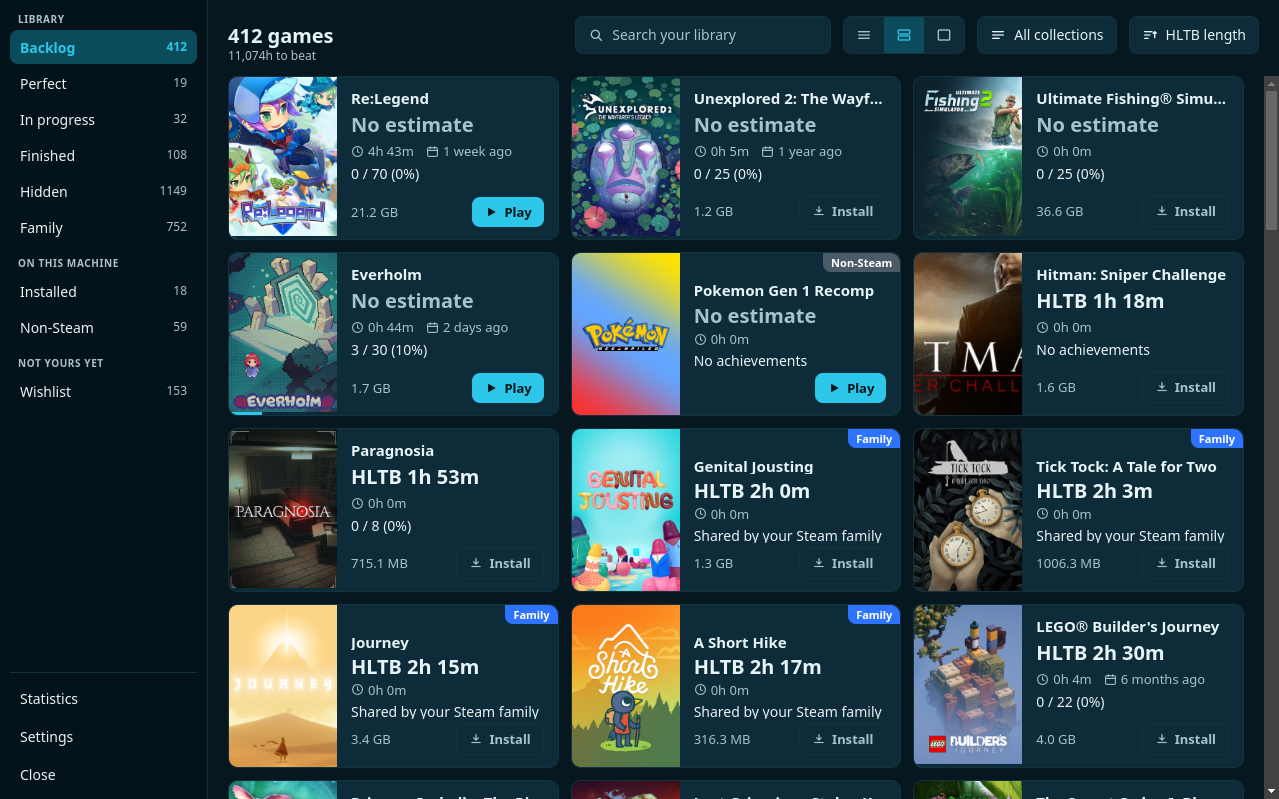
The GameLynx library
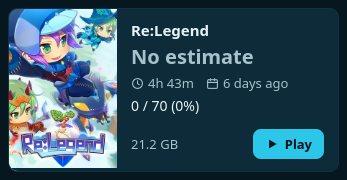
One game as a card
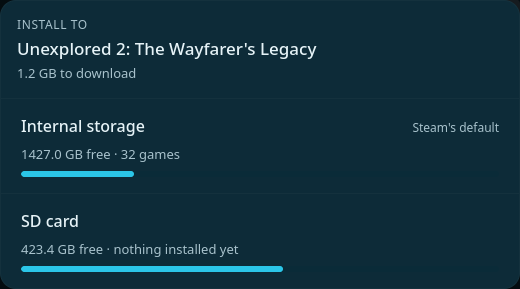
Choosing a drive to install to
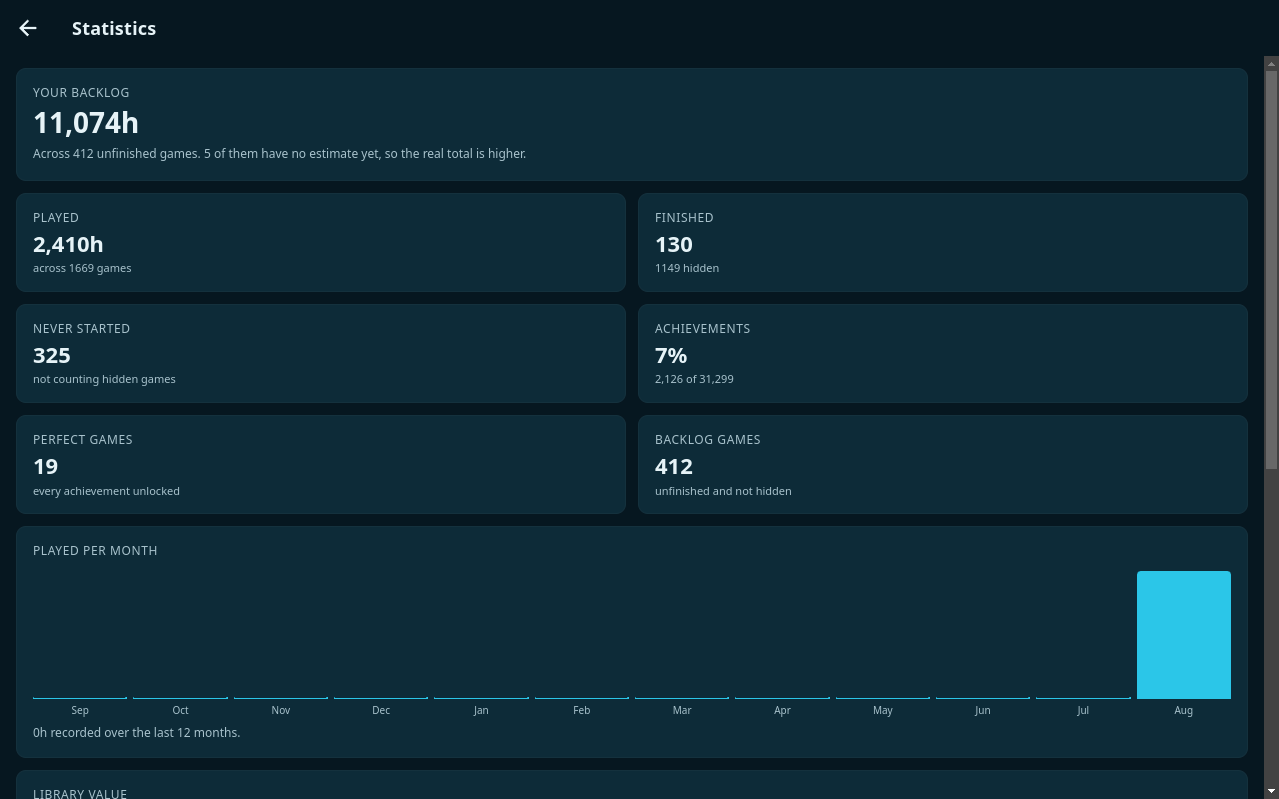
11,074 hours of unfinished games, in one figure
2,025 games with their download size attached
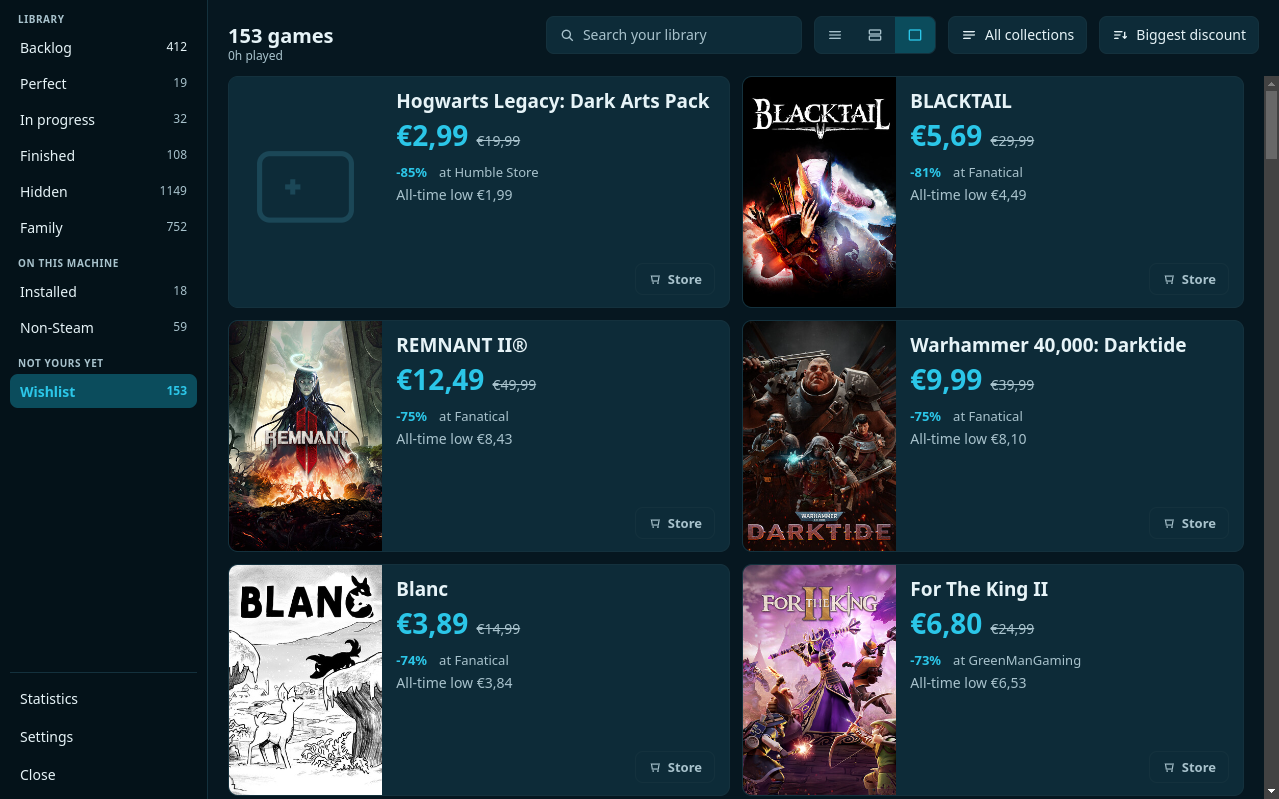
153 wishlisted games with live prices
0 servers holding your data

The problem

A library of 2,000 games is not a library. It is noise.

You scroll past hundreds of titles you picked up in a sale, nothing stands out, and you start the same game for the sixth time. Not because there is nothing better in there, but because you cannot see what is in there.

GameLynx splits your library along the questions you actually ask. What have I not started? What is nearly done? What have I not touched in months? Every answer sits in the rail with its count beside it, before you press anything.

  • Backlog everything unfinished, and not hidden
  • Perfect every achievement unlocked, and worth being proud of
  • Family what you can play through your Steam family without owning it
The library with its filters

Time, not titles

How long does this actually take?

Every card carries how long the game runs according to HowLongToBeat, submitted by players who kept track of their own playthrough. Add that up across your backlog and you have a figure worth something.

Two hours on a Tuesday evening? Sort by length and take something that fits. Holiday coming up? Go find the forty-hour game you have been circling for three years.

  • Sort by length short to long, or the other way around
  • Wrong match? Pick the right entry yourself
  • Your choice sticks the weekly refresh leaves it alone
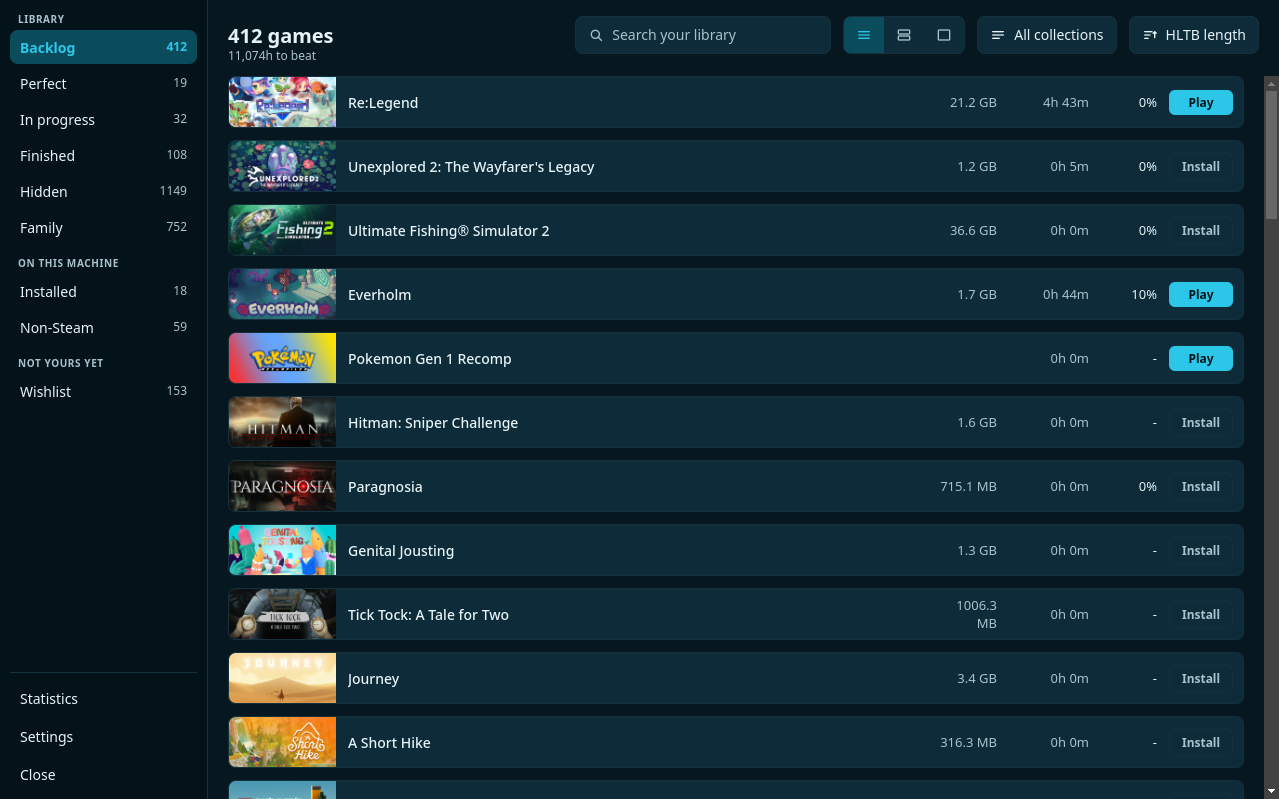
The library as a dense list

On the Deck

From browsing to playing in one press

GameLynx is built for a Deck in your hands. The stick moves the selection, A chooses, X plays or installs. A bar along the bottom always says what the buttons do right now.

Play without a detour

The button on the card starts the game through Steam, in Game Mode as readily as on the desktop.

Install where you want it

Internal or SD card, chosen before the download starts, with the free space on both in front of you.

All of it on the controller

Not one screen that needs a mouse. Searching and sorting work on the buttons too.

Three densities

A list to search, cards to choose, large cards to browse. Your choice is remembered.

Downloads in view

While something is downloading the card counts the percentage, then turns into a play button on its own.

Achievements, explained

Hidden ones included, filled in with the descriptions Steam leaves blank, and sorted by how rare they are.

Quiet failures get said

When a sign-in expires or a source stops answering, it is at the top of your list — with the button that fixes it beside it.

The drive

Internal or SD card, asked before it is too late

On a Deck this is a real decision: the internal disk is fast, the card is large. Steam asks afterwards in a window of its own, or does not ask at all. GameLynx asks where the decision is made, with the free space on each drive beside it.

If a game will not fit comfortably, the app says so before you start rather than twenty minutes into the download.

The panel that asks which drive

Wishlist

75% off means nothing. This does.

Every shop shouts that there is a discount. What you want to know is different: is this cheap for this game, or merely cheaper than yesterday. That needs a price history no shop will hand you.

GameLynx puts the lowest price that game has ever been anywhere next to the price today. Sitting at its record, and the app says so in as many words.

What the shop says -75%

€12.49 in the sale

What you need to know €8.43

is what it has been. So wait.

  • Steam keys only, so no deal that parks your game somewhere else
  • Sort by discount and the best offer is first
  • Not out yet? That is on the card too
The wishlist with prices and discounts

Statistics

What you played, when, and how much is still waiting

Steam keeps one total per game and nothing else. GameLynx builds a history of its own: at every sync it sees what changed and writes it down. After a few weeks you have charts Steam could never have drawn.

  • Pick a year and every figure and chart answers for that year
  • Per game how long you played it, and when you last touched it
  • Per year, grouped by month, so a year reads as the games it consisted of
  • Per hour of the day, so you can see when you actually play
  • The value of your library at today's shop prices
  • Your backlog in years, at the pace you actually play
  • Your year as a picture, one press and ready to send
The statistics screen

Two services, one list

Your PlayStation games sit right there with the rest

Link your Steam account, your PlayStation account, or both. What you own is one library: the same cards, the same filters, the same hour counts. A small square in the corner of each card says where a game came from — and it only appears once there are genuinely two services to tell apart.

  • Trophies beside achievements, with rarity and when you earned them
  • Your trophy level and every platinum, gold, silver and bronze, in settings
  • Artwork from SteamGridDB for the games Sony ships nothing for
  • Filter by service, or leave both mixed together

Signing in happens on Sony's own page. GameLynx keeps only the session it is handed back, and never writes anything to your account.

Steam and PlayStation games in one list

Deck, desktop, phone and browser

One of them plays. The others keep up.

The build on your computer sits next to Steam and can read it: what is installed, what it takes up, the artwork you replaced, the collections you keep. Your phone and your browser have no Steam client to read and ask Steam's API instead, which answers a narrower question. They all write to the same backup, so what the computer learns is on the other two by the time you pick them up.

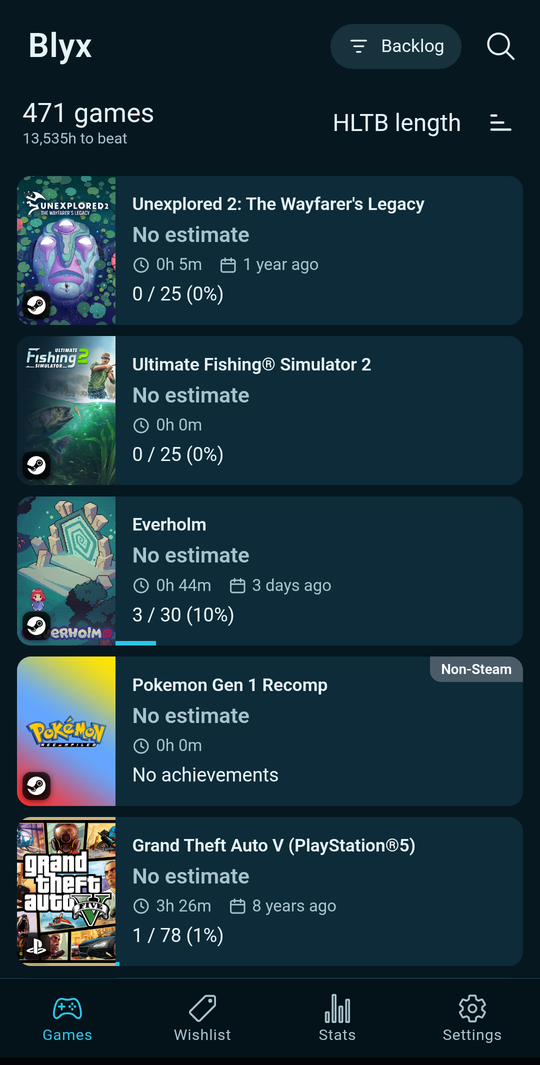
GameLynx on a phone

On the Steam Deck and the desktop

A grid with a rail beside it, driven entirely by the stick: A opens, B goes back, X plays or installs. It reads your Steam installation, so it knows what is on your drive, how much room it takes and which Steam collections you keep. Playing and installing happen from the app, including the choice between internal storage and the SD card. If Game Mode gives you a black window, the manual has the launch options. It is the only build that can see any of that, which is the reason to have it on the machine you play on rather than only where you browse.

On your phone

The same library as a list of cards — tall artwork, the Family and Non-Steam labels, and one filter button instead of a bar full of chips. Your Steam collections are there to filter by, search looks through everything at once and says which list each result sits in, and the wishlist can ring once a day when something on it goes on sale. An offer opens in your own browser. Playing and installing are not there — a phone cannot — and family games arrive by way of the backup, since only the Steam client knows about them.

In a browser

gamelynx.app/app opens the same library in a tab, and puts itself on a phone's home screen if you add it there. It signs in to Steam and to Google on its own and keeps everything on the device, exactly as the others do. On a wide window it lays itself out like the desktop build and on a narrow one like the phone. What it cannot do is play, install, or read a Steam client — there is none in a tab — so it is at its best alongside a computer that has one.

What is the same everywhere

Your library, your hidden games, what you finished, the HowLongToBeat entries you matched by hand, your achievements and trophies, your wishlist — and the artwork you replaced by hand in Steam, which travels to your other devices scaled down. The backup carries all of it, including your settings and your sign-ins, and merges rather than overwrites.

In your own language

Dutch, English, German, French, Spanish and Italian. It opens in whichever your device is set to and falls back to English otherwise, and you can pick one yourself at any time. A few words stay put on purpose: achievements and trophies are what Steam and Sony call them, and HowLongToBeat's four measurements keep that site's own names, because the link to the page they came from is right underneath.

Yours, and nobody else's

No account. No server. No adverts.

GameLynx runs entirely on your own device. There is no backend your library ends up in, because there is no backend at all.

Everything stays local

Your library lives in a database on the device itself.

Backup to your own Drive

Once a day, into a folder you can open. Nothing else in your Drive is touched.

Works offline

On a train, at a campsite: the whole library stays visible, artwork and figures included.

Updates itself

New versions arrive in the background, with one button to restart into them.

On your phone too

The same library in your pocket, with the same figures and the same filters.

Changes nothing in Steam

The app reads. All it ever asks is: start this game, or install it.

What it runs on

One host, as many companions as you like

Every one of them works on its own: connect your Steam account and you have your library, your completion times and your achievements, wherever you installed it. What differs is how much they can see. A host sits on the machine you play on, next to Steam, and is the only one that can read the client itself — which games are installed and on which drive, how much room they take, the collections you keep, the family libraries you can reach. A companion has no client to read and asks Steam's API instead, which answers a narrower question. Run both and the companion gets the wider answer too.

Hostreads the Steam client on the machine

Windows

A portable file, no installer. Sits beside Steam and reads it.

GameLynx-3.0.23-windows.exe

Steam Deck and Linux

An AppImage. Add it to Steam as a non-Steam game and drive it with the stick.

GameLynx.AppImage

macOS

Apple Silicon and Intel, one file each.

GameLynx-3.0.23-arm64.dmgGameLynx-3.0.23-x64.dmg

Companionworks on its own, sees more alongside a host

Android

Phone and tablet. Everything except starting a game and installing one.

Get it on Google Play

Your browser

Nothing to install, and it goes on a home screen if you want it to.

gamelynx.app/app

How they reach each other: your own Google Drive

You do not have to, and nothing stops working without it. What it adds is the one thing a companion cannot find out by itself. In Settings, sign in with Google on each device. Once a day each writes what it has learned into a GameLynx Backups folder in your Drive and reads what the others left there — so your collections, your family library and what is installed where reach your phone and your browser, and the completion times already looked up and the playtime history never have to be gathered twice.

It is your Drive, not ours — there is no account here and no server in between. GameLynx can only see the files it creates itself; the rest of your Drive is closed to it. Each device keeps its own file and reads the others', so a change you make on one shows up on the rest. Skip it and everything still works, on that device alone.

Free, with no account here. The Windows and macOS builds are unsigned, so your system warns once on first launch.

If it turns out to be useful

GameLynx is free and stays free: no account here, no ads, nothing measured inside the app, nothing sold on. There is a tip jar for anyone who wants one — it pays for the domain and the hosting, and after that for a code signing certificate, which is the thing that would stop Windows and macOS warning you the first time you open a build made by one person in their spare time.

Nothing is behind it. No rewards, no tiers, no features waiting for a total to be reached.

Buy me a coffee at ko-fi.com

Getting started

Three steps, five minutes

Download

Take the file, put it with your other programs, and add it to Steam as a non-Steam game.

Connect

On a Deck the app already knows who is signed in. One key from Steam and you are through.

Let it run

The first sync fetches everything. After that it keeps itself current, wishlist and prices included.

Questions

What people want to know

Does it cost anything?

No. No price, no subscription, no adverts, no paid extras. It is a personal project.

Do I need an account?

Not with us. You connect your own Steam account with a key you get from Steam itself. If you want a backup in Google Drive you sign in with Google, and that part is optional.

Where is my data?

On your device, in a database belonging to the app. There is no server of ours involved. The only place anything is sent is your own Drive, if you connect one.

Does it change anything in my Steam library?

No. GameLynx reads what Steam publishes and what the Steam client stores on your device. All it ever asks Steam to do is start or install a game. Hiding and marking things finished happens inside GameLynx only.

Does it work in the Deck's Game Mode?

Yes. Add it to Steam as a non-Steam game and it starts like anything else. The whole interface is built for the controller.

Where do the completion times come from?

From HowLongToBeat, submitted by players. If a match is wrong you pick the right entry yourself, and that choice is never overwritten afterwards.

And the prices?

From IsThereAnyDeal, which tracks prices across some fifty shops including the lowest a game has ever been. Only offers that hand over a Steam key are shown.

What happens without internet?

Everything keeps working except updating. Your library, your figures, the artwork and the achievement lists are all on the device.

Your backlog is not getting any shorter.

But you finally know what you are starting.